Lotus: A Water Lily-Inspired Color Font for Modern Design
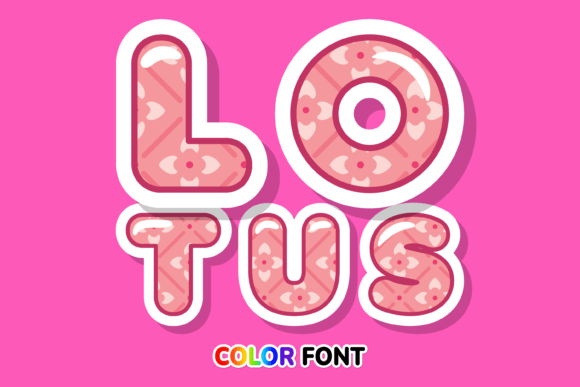
Imagine capturing the delicate beauty and vibrant energy of a water lily in a single typeface. The Lotus font does exactly that, offering a stunning color font designed in the style of a water lily. This isn't just another letterform; it's a creative asset that brings an organic, artistic flair to any project. Whether you're crafting custom designs, developing DIY projects, or building a brand that requires a lovely, unique touch, Lotus provides an incredible visual foundation.
As a professional graphic design tool, Lotus operates as an OpenType-SVG color font. This means it supports multiple colors and gradients within a single glyph, creating a rich, dimensional effect that standard fonts cannot achieve. This capability is transformative for visual design, allowing for immediate impact in logo design, social media graphics, and editorial layouts. Its compatibility with key software like Adobe Photoshop, Illustrator, and Inkscape makes it accessible for a wide range of creative workflows, though it's important to note its limitation with Cricut machines.
Practical Applications for Visual Impact
The true value of a design asset like Lotus lies in its application. Its water lily inspiration lends itself perfectly to projects aiming for themes of nature, elegance, serenity, or modern organic aesthetics. Consider integrating it into your design toolkit for:
- Brand Identity & Logo Design: Use Lotus to create a memorable, artistic logo for brands in wellness, beauty, floristry, or boutique hospitality. Its unique character helps establish a distinctive brand identity.
- Digital Marketing & Social Media: Craft eye-catching headlines for social media graphics, email banners, or digital ads. The color font naturally draws the eye, improving engagement in fast-scrolling feeds.
- Packaging & Product Design: Elevate product labels, boxes, or merchandise with a touch of artisanal charm. The font's detail shines in high-resolution print, enhancing the unboxing experience.
- Editorial & Web Design: Use it for feature article titles, magazine covers, or hero section headings on a website. It creates a strong visual hierarchy and sets a specific mood immediately.
- Presentation & Digital Products: Transform standard presentations or digital planners into polished, professional documents that captivate an audience.
Integrating Specialty Fonts into Your Design Workflow
Introducing a specialty font like Lotus requires thoughtful strategy to maintain design consistency and effectiveness. First, always evaluate its readability at the intended size and context. While stunning for headlines, it may not be suitable for long body text. Pair it with a clean, neutral sans-serif or serif font to balance its artistic expression and ensure clear communication.
Consider your existing color palette and brand guidelines. The colors within Lotus are fixed, so ensure they complement your project's overall scheme. Use it as a focal point to enhance, not overpower, your visual hierarchy. For web and UI design, test its rendering across devices to ensure the SVG details remain crisp. Ultimately, the goal is to use Lotus to solve a communication challenge—whether that's conveying elegance, creativity, or a connection to nature—while maintaining a cohesive and professional presentation.
Selecting the right creative assets is a critical step in the design process. Tools like the Lotus font offer more than just aesthetic appeal; they provide a means to inject personality, tell a story, and create an emotional connection with an audience. By thoughtfully integrating such elements, designers and creators can elevate their work, strengthen brand narratives, and produce visuals that are both beautiful and strategically effective. Quality typography is a cornerstone of impactful design, and specialized fonts open new avenues for innovation and expression in any creative project.